



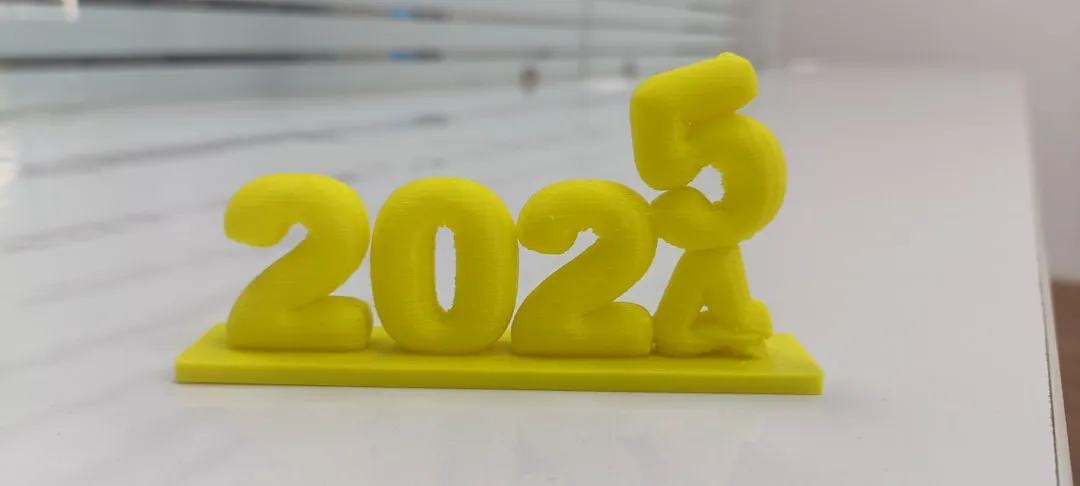
12 3D Printing Projects That Are Perfect For Beginners
Difficulty: Novice
Time: 30 minutes - 3 hours per project
Cost: $2-15 in filament per project
Why You'll Like This
Starting your 3D printing journey can feel overwhelming with endless project possibilities and technical settings to master. The key is choosing designs that teach you fundamentals while actually being useful—projects that won't waste filament on your learning curve and give you confidence to tackle bigger challenges.
These 12 beginner-friendly projects focus on simple geometries, forgiving tolerances, and practical results. Each one builds specific skills you'll use in more complex prints later, from understanding layer adhesion to getting comfortable with support materials.
What You'll Need
Materials
PLA or PETG filament (1-2 spools for all projects)
Isopropyl alcohol for bed cleaning
Digital calipers (recommended)
Desiccant packets for filament storage
Tools
3D printer with heated bed
Computer with slicer software
Airtight containers for filament storage
Basic hand tools for assembly
Safety First
Ensure adequate ventilation, especially with ABS or specialty filaments
Never leave prints unattended for the first few layers
Keep the print area clear of flammable materials
Use caution with heated components; supervise use when necessary.
Power off printer at the switch when not in use
Essential Prep: Getting Your Printer Ready
Before diving into projects, master three foundational elements that make or break beginner prints. First, ensure your print bed is properly leveled—this single factor prevents more failed prints than any other adjustment. Most printers include a bed leveling routine in their menu system.
Second, choose the right filament temperature for your material. PLA typically prints well at 200-220°C, while PETG requires 230-250°C. Start with manufacturer recommendations, then adjust based on your specific printer's behavior.
Third, get familiar with your slicer's basic settings. Set layer height to 0.2mm for most beginner projects—it's the sweet spot between print speed and surface quality. Use 20% infill for functional items and 10-15% for decorative pieces. Think of infill as the internal honeycomb structure that gives your print strength without using excessive filament.
Tip: Your first few prints will teach you more about your specific printer than any manual ever could. Don't get discouraged if things don't work perfectly right away.
Projects 1-4: Master the Fundamentals
Smartphone Stand
This classic beginner project teaches you about overhangs and print orientation—the art of working with gravity instead of against it. Position the back support leaning against the build plate rather than trying to print it upright. When oriented correctly, the angled design requires no supports, demonstrating how strategic part placement eliminates the need for additional material. Print time: 45 minutes. Key learning: optimal part orientation.
Cable Management Clips
Small, quick prints perfect for testing bed adhesion and fine-tuning your first layer settings. The clip mechanism introduces you to functional tolerances—the precise balance between parts that move smoothly without being loose. Print multiple sizes to organize different cable thicknesses, and experiment with different settings without wasting much time or filament. Print time: 15 minutes each. Key learning: dimensional accuracy and functional fit.
Desk Organizer Tray
A simple rectangular tray with dividers teaches layer adhesion fundamentals and helps you recognize good versus problematic first layers. The large flat base amplifies any bed leveling issues—if one corner lifts or the lines don't stick evenly, you'll see it immediately. This visual feedback helps you understand what proper bed adhesion looks like for future projects. Print time: 2 hours. Key learning: large flat surface adhesion.
Key Chain Name Tag
Introduces text printing and fine detail resolution limits of your specific printer. Experiment with different fonts and text depths, keeping text height at least 1mm for clear readability. This project reveals your machine's capability boundaries—some printers handle tiny text beautifully, others need larger, bolder fonts to look crisp. Print time: 20 minutes. Key learning: fine detail capabilities.
Projects 5-8: Building Complexity Gradually
Simple Vase or Planter
Move beyond basic shapes to curved surfaces and varying wall thicknesses. Building on your layer adhesion knowledge from the tray project, this teaches how layer height affects surface smoothness on curves—smaller layers mean smoother curves but longer print times. Use "vase mode" in your slicer for single-wall printing, which creates one continuous upward spiral instead of distinct layers, often producing smoother results than traditional layer-by-layer printing. Print time: 1.5 hours. Key learning: curved surface quality.
Drawer Pulls or Cabinet Knobs
Functional hardware replacement introduces you to threaded inserts and assembly techniques. Apply your dimensional accuracy skills from the cable clips to match existing hardware spacing—measure twice, print once definitely applies here. Consider ergonomics when designing the grip area, keeping edges rounded for comfortable use. Print time: 30 minutes each. Key learning: functional fit and finish.
Note: If you're renting, check with your landlord before replacing any permanent fixtures.
Desk Fan Blade Guard
Your first project requiring precise measurements and safety considerations. This protective cover must fit securely without interfering with fan operation. Apply your measurement skills while adding 1-2mm clearance for air circulation—you want protection without blocking airflow. This project teaches you that some prints have real consequences if they don't fit properly. Print time: 1 hour. Key learning: safety-critical tolerances.
Modular Storage Boxes
Stackable containers teach you about interlocking designs and consistent dimensions across multiple prints. Building on your tolerance understanding from previous projects, design tongue-and-groove features for secure stacking—usually a 1-2mm lip works well. Start with one size, then scale up or down for different storage needs. Each box needs to work independently but also integrate with all future boxes you'll print. Print time: 2.5 hours per box. Key learning: multi-part system design.
Projects 9-12: Ready for More Challenge
Simple Mechanical Toy
A basic gear system or spinning top introduces moving parts and assembly sequences. This advances your tolerance knowledge to rotating components—typically 0.3-0.5mm gap for smooth operation without excessive wobble. Print gears separately for easier troubleshooting and replacement if needed. There's something satisfying about printing gears that mesh together properly on the first try. Print time: 1.5 hours total. Key learning: mechanical tolerances.
Garden Plant Stakes
Weather-resistant outdoor applications require material considerations beyond your PLA experiments. Use PETG or ASA filament for better outdoor durability than PLA, which becomes brittle in sunlight and temperature swings. Design pointed ends for easy soil insertion and consider wind load on larger plants. This project introduces you to matching materials with their intended environment. Print time: 45 minutes each. Key learning: material selection for environment.
Custom Tool Holders
Precise measurement and custom fitting skills combine workshop organization with your dimensional accuracy expertise. Measure your tools carefully using digital calipers if available, adding about 1mm clearance for easy insertion and removal—too tight and you'll struggle to use it, too loose and tools will rattle around. Consider tool weight and mounting method for wall-hung holders. Print time: 2 hours. Key learning: custom measurement and fitting.
Replacement Parts
The ultimate practical application—fixing broken household items with custom-designed replacements. Start with simple geometric shapes like knobs, spacers, or brackets before attempting complex curved parts. Apply all your measurement and fitting skills from previous projects, testing fit frequently during design iterations. This is where 3D printing really shines in everyday life—that plastic clip that broke on your vacuum cleaner or the knob that fell off your appliance can be replaced faster than ordering online. Print time: varies by complexity. Key learning: reverse engineering and problem-solving.
Cleanup & Disposal
Store unused filament in airtight containers with desiccant packets to prevent moisture absorption. Wet filament creates print quality issues from poor surface finish to weak layer adhesion. Those silica gel packets from electronics packaging work perfectly for this.
Clean your print bed after each session with isopropyl alcohol for most surfaces, acetone for stubborn residue on glass beds. A clean bed ensures proper adhesion for your next project.
Dispose of failed prints and waste filament according to local recycling guidelines. PLA is biodegradable under industrial composting conditions but may not be accepted in standard recycling programs. Check with local waste management for proper disposal methods.
Troubleshooting
Problem: First layer won't stick → Fix: Re-level bed, increase bed temperature by 5-10°C, clean print surface with isopropyl alcohol
Problem: Stringy or messy overhangs → Fix: Lower print temperature by 5°C, increase cooling fan speed, adjust retraction settings
Problem: Layer separation or weak prints → Fix: Increase nozzle temperature, check for drafts cooling the print too quickly, verify filament quality
Problem: Dimensional inaccuracy → Fix: Calibrate extruder steps, check belt tension, measure filament diameter and update slicer settings
Variations & Upgrades
Budget-Friendly Options: Start with PLA filament and basic geometric designs before investing in specialty materials or complex projects
Renter-Friendly Alternatives: Focus on removable organizers and temporary fixes rather than permanent hardware replacements
Kid-Safe Projects: Adult supervision required for all heated operations. Consider cold-pull printing or post-processing activities for younger participants
Advanced Upgrades: Once comfortable with these basics, try multi-color prints, soluble supports, or flexible filaments
FAQ
Can I use different filament types for these projects? PLA works for most indoor applications and is easiest for beginners. PETG offers better durability for functional parts. Avoid ABS until you're comfortable with ventilation requirements and warping issues.
How much filament will I waste learning? Budget about 20-30% extra filament for failed prints and test pieces. Most of these projects use 10-50g of filament each, so failures aren't expensive lessons.
What if my printer doesn't have a heated bed? PLA can print on unheated beds with proper adhesion aids like glue stick or painter's tape. Focus on smaller projects initially to minimize warping issues.
Keep a print log noting successful settings for each project. Record nozzle temperature, bed temperature, print speed, and any modifications that improved results. This reference becomes invaluable as you tackle more complex projects and will save you time when you're trying to remember exactly what settings worked perfectly months ago.
Ready to level up? These foundational skills prepare you for multi-material prints, support structures, and original design work that solves your specific problems. The real magic of 3D printing isn't in downloading other people's designs—it's in creating solutions to problems that only exist in your life.




Comments
Be the first, drop a comment!